


Cartoonify Me – Toon Photos
4.0878.00 Reviews
App Specs
- Version
- 5.3.0
- Updated On
- License
- Free
- Downloads
- 10,000,000+
- Developer
- Tiki Punch Studio
- Categories
- Photography
- Platform
- Android
Screenshots
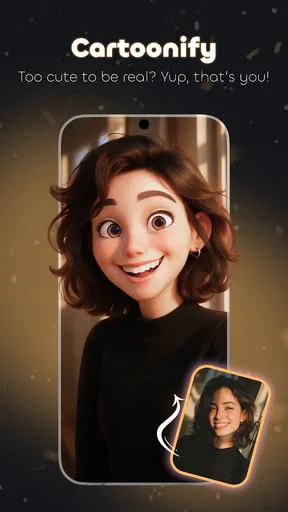
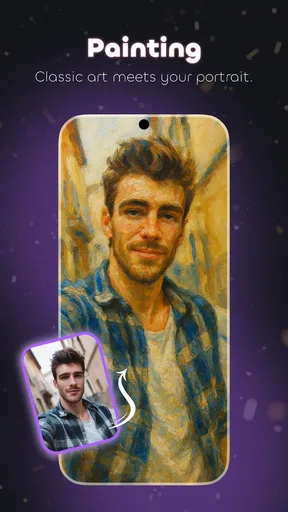
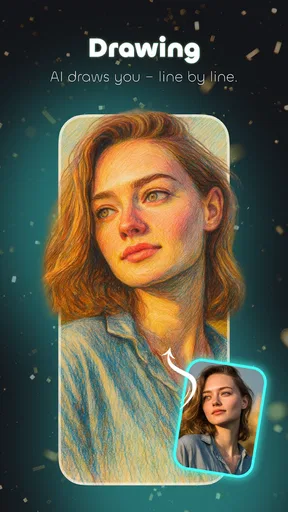
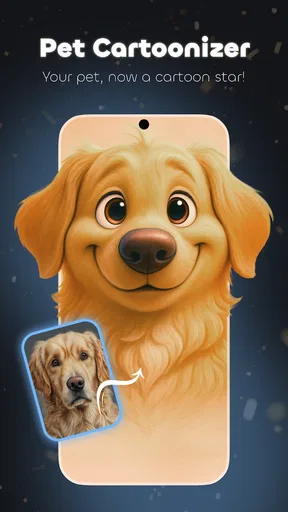
 Analysis by AppCompare
I find the most frustrating moment with a photo-effects app is usually not choosing a look; it is getting a picture ready that the effect can handle well. With Cartoonify Me – Toon Photos, I’d start with a clear, well-lit image where the face is easy to see. A sharp selfie or a pet looking toward the camera gives the transformation a better chance of keeping its subject recognizable. If the result seems odd, I’d try another photo before assuming the app itself is at fault.
Before you blame the effect
Cartoon styles simplify detail, so a busy background, deep shadows, or several faces competing for attention can make a portrait feel less convincing. I get the most useful comparisons by testing one photo with a few looks, rather than changing the picture and the style at the same time. That makes it easier to tell whether I prefer a softer treatment, stronger outlines, or a more graphic finish.
It also helps to decide what the image is for before editing. A close-up intended as a profile picture has different needs from a playful image for a group chat. For a profile, I’d keep the face large and avoid covering it with decorations; for a joke or greeting, a speech bubble can be the point. This small choice saves time and keeps the finished image from feeling cluttered.
Simple setup checks that save time
When an image takes longer to process, I’d first check whether I selected a particularly large photo and whether other demanding tasks are running on the phone. Waiting a moment and trying a smaller or less detailed source image is a sensible next step. If the app is not responding, closing and reopening it is a basic recovery step before repeating the edit.
For anyone using an older device, compatibility is worth checking before installing: Cartoonify Me is listed for Android 6.0 and up. It is a free photography app from Tiki Punch Studio, rated for Everyone, and its current version is 5.3.0. The app has reached over 10 million installs, with an average rating of 3.9 from around 31,000 ratings. Those figures suggest a widely tried tool, but they do not guarantee that every style or image will suit your taste.
A more deliberate editing workflow
My practical approach is to keep the original photo untouched, make a cartoon version, and compare the two before sharing. If a first result looks too harsh, I’d try a different style before reaching for extra adjustments. If the face is obscured by a sticker or caption, I’d remove that element rather than adding more decoration to compensate. One change at a time makes it easier to recover from an edit that has gone in the wrong direction.
For a small social image, a quick preview on the phone is usually enough to judge whether the subject reads clearly. If the picture is meant for a larger display, I’d inspect it more carefully before posting, especially around fine facial details and outlines. A cartoon filter is meant to reinterpret a photo, not preserve every detail as a conventional photo editor would, so I would not choose this workflow for careful retouching or faithful image correction.
Worth Reading Before You Choose

EA SPORTS FC Mobile 26 Is a Bigger Football Game, but It Takes Time

Flipboard Shows What News Apps Must Do Beyond the Feed

Switching to Android Auto Means Rethinking Your Driving Routine

Google Calendar Makes a Crowded Week Easier to Manage

Ludo King Makes the Most of the Minutes Between Plans

Baby Panda World Brings Quick Play to Modern Phones, but Its Game Library Feels Busy
When the phone or source image is the real issue
If an edit stalls or looks unexpectedly rough, I would separate the possible causes: try a simpler image, allow the phone a little breathing room, and repeat the same style once. If that one image continues to disappoint while another works, the source is probably the more useful thing to change. If every attempt has trouble, restarting the app and checking that the device meets the minimum Android requirement are reasonable first checks.
There is a trade-off here: a fast, playful transformation is convenient, but it gives me less control than a dedicated editor built for precise masks, layered retouching, or detailed color correction. I would also avoid treating a cartoon result as a faithful record of someone’s appearance. The fun is in the interpretation, and that is exactly why different photos can produce noticeably different outcomes.
Ever wondered what you'd look like as a cartoon character? Well, now you can stop wondering and start transforming with Cartoonify Me – Toon Photos. This app is here to turn your wildest cartoon dreams into reality. I spent some quality time with it, and here's the lowdown on what this app has to offer.
Getting Started with Cartoonify Magic
From the moment you open Cartoonify Me – Toon Photos, it feels like stepping into a whimsical art studio. The interface is super user-friendly, with everything laid out intuitively. You don't need to be a tech wizard to navigate through it, which is a big plus in my book. Plus, the app's vibrant color palette is like eye candy that just puts you in the mood to get creative.
Transforming Your Photos
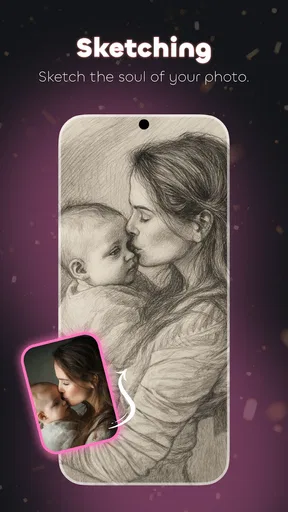
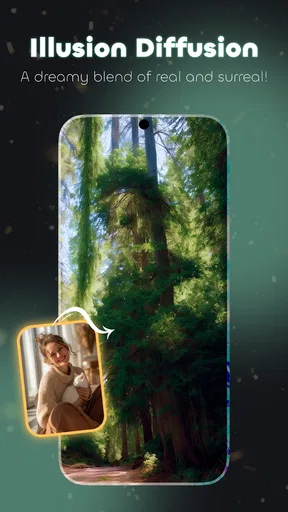
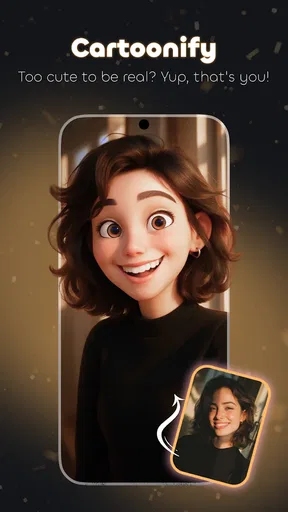
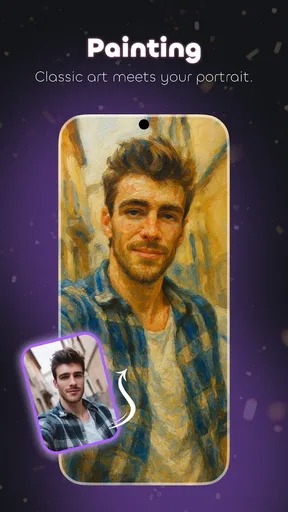
The core feature of this app is its ability to transform regular photos into cartoon versions. All you need to do is upload a picture, and let the app work its magic. The transformation process is quick and seamless. Within seconds, my plain old selfies turned into fun, cartoonish portraits. And it's not just for selfies—pets, landscapes, you name it, can all be cartoonified.
One thing I absolutely love is the variety of styles available. Whether you're into classic cartoons, anime vibes, or even pop art, there's something for everyone. The app lets you experiment with different looks, so you can find the one that suits your style best. It's like having a virtual cartoon artist at your fingertips.
Customization and Fun Add-ons
Beyond the basic cartoonification, there are tons of customization options. You can tweak everything from the thickness of the outlines to the saturation of colors. Want to add a little humor? The app includes hilarious stickers and speech bubbles that you can slap onto your cartoons. I found myself chuckling as I added quirky captions to my toonified self.
There’s also an option to create animated GIFs. This feature is perfect for when you want to spice up your social media with something eye-catching. I tried making a GIF of my dog running in the park, and it turned out to be a hit among my friends!
Sharing Your Creations
No modern app would be complete without easy sharing options, and Cartoonify Me – Toon Photos delivers on this front. Once you’ve crafted your masterpiece, sharing it on platforms like Instagram, Facebook, or Twitter is just a tap away. The app automatically optimizes the images for social media, saving you the hassle of resizing or cropping.
A Few Quirks
Now, as much as I enjoyed using the app, there are a couple of quirks worth mentioning. Sometimes, the app can be a bit slow, especially when working with high-resolution images. It’s not a dealbreaker, but a little patience is required if you’re working with larger files.
Additionally, while most features are free, some of the more advanced styles and effects require in-app purchases. It's a common model for apps these days, but it's something to keep in mind if you're on a tight budget.
For an everyday example, I’d use it after taking a quick photo of my dog during a walk: pick a frame where the face is visible, test a couple of cartoon treatments, and save the one that still looks like him. A short moving clip can make a lively GIF, but it is not automatically the best choice for every post; a still portrait is easier to inspect and can be more readable as a small avatar. I’d make the still first, then try the animated version if movement adds something rather than merely making the file busier.
Choosing it over a general photo editor
Compared with a standard photo editor, this app is aimed at a narrower, more playful outcome. A general editor is usually the better choice when I need precise cropping, blemish correction, lighting fixes, or control over several layers. Here, the advantage is getting to a cartoon look and trying different treatments without building that effect manually. I’d use both for different jobs: correct a photo elsewhere if it needs careful cleanup, then bring a suitable image into this app for a stylized portrait.
That distinction matters if you are making an image for work, a formal profile, or a print where accuracy is important. Cartoonification changes the look of the subject by design, and a strong filter can exaggerate features or flatten detail. For a casual avatar, a playful card, or a funny reaction image, that can be exactly right. For a polished headshot that still needs to look like a conventional photograph, I’d choose another kind of editor.
Making the result feel intentional
One useful habit is to save a clean version before adding stickers or a caption. Then I can make a second, more playful copy without losing the portrait itself. I also try to keep the subject and any text apart: a bubble placed over eyes or a pet’s expression can turn a clear joke into a hard-to-read image. Small-screen previews are forgiving, so I check the finished composition at the size where friends are likely to see it.
For a set of matching avatars, I’d use photos taken in similar light and frame each person at roughly the same distance. That gives the cartoon treatments a more coherent feel even if the source pictures are different. The trade-off is that a single app’s selection of looks may not give everyone the same flattering result; if one portrait turns out too severe, I’d change its source image or style rather than forcing every image into an identical treatment.
Who will enjoy it, and who may not
I think this is most appealing to people who want quick, expressive images for social use and enjoy trying several looks without learning a complicated editing workflow. It is also an easy creative activity to share with friends or family: each person can pick a picture and compare which treatment feels most like them. Since it is rated for Everyone, it is presented as suitable for a broad audience, though I would still guide younger users when they are choosing photos to share publicly.
People who want detailed control, dependable results across a batch of images, or a natural-looking retouch should probably skip it as their main editor. The playful tools are the reason to open it, but they also mean that the final look can be less predictable than a manual edit. If you need a consistent visual identity for a large collection, a workflow with reusable presets and more exact controls may serve you better.
Getting past a disappointing first result
If the first transformation misses the mark, I would not immediately add more effects. I’d return to the original, check that the face is unobstructed, and test another style. A photo with a clear expression and even light is a better starting point than one with motion blur or strong shadows. For a landscape, I’d choose a scene with a recognizable main subject; otherwise, the app may produce a colorful treatment without a clear focal point.
When sharing does not look the way I expected, I’d inspect the saved image in the phone’s gallery before editing it again. That helps separate a result issue from how a social app displays or crops an image. If the picture itself looks right but appears awkward in a post or profile frame, adjusting the crop at the destination may be enough. I would avoid repeatedly reprocessing a good result just to compensate for a platform’s preview.
Final Thoughts
In the world of photo editing apps, Cartoonify Me – Toon Photos stands out as a fun and creative tool. It’s perfect for anyone looking to add a bit of whimsy to their photos. Whether you're a social media aficionado or just someone who loves to experiment with art, this app offers plenty of entertainment and creativity.
So, if you're ready to see yourself in a whole new light, give Cartoonify Me – Toon Photos a try. It's like stepping into a cartoon world where you're the star, and trust me, it's a blast!
My practical verdict is to treat it as a focused creative extra rather than a replacement for every photo tool on your phone. The free entry point makes it easy to explore, while the 3.9 average across around 31,000 ratings is a useful reminder that tastes and results vary. I’d try it when I want a lively portrait, a pet image with personality, or a quick visual joke; I would not rely on it for exact retouching or a uniform professional set.
There is enough here to make experimentation worthwhile, especially if I begin with a good source photo and keep the first edit simple. The app’s best use is not turning every picture into a cartoon, but giving one ordinary image a distinct, shareable character. If that is what you want, Tiki Punch Studio’s photography app is an enjoyable option to keep at hand; if your priority is precision, a conventional editor is the more sensible choice.
Pros
- User-friendly interface makes editing easy.
- Offers a variety of cartoon styles.
- Quick processing time for photos.
- Supports both photos and live camera.
- Regular updates enhance features.
Cons
- Limited free features without subscription.
- Occasional ads can interrupt workflow.
- Some styles lack customization options.
- Requires internet for most functions.
- High-resolution exports need premium.
FAQs for Cartoonify Me – Toon Photos
What is Cartoonify Me – Toon Photos?
Cartoonify Me – Toon Photos is an app that transforms your photos into cartoon-style images. It offers a variety of filters and editing tools to give your pictures a unique, animated look. Whether you want to create a fun profile picture or share whimsical images with friends, this app provides a creative outlet for personal expression.
How user-friendly is the app for beginners?
Cartoonify Me – Toon Photos is designed with user-friendliness in mind. Its intuitive interface makes it easy for beginners to navigate. Most features are accessible with a few taps, and the app includes tutorials to guide new users through the process of cartoonizing their photos, ensuring a smooth experience from the start.
What are the main features of Cartoonify Me – Toon Photos?
The app offers a range of features including multiple cartoon filters, adjustable settings for customizing effects, and basic photo editing tools like cropping and brightness control. Users can also apply text and stickers to their images. These features allow for a high degree of personalization, making each cartoon unique.
Is Cartoonify Me – Toon Photos free to use?
Cartoonify Me – Toon Photos is free to download and offers basic features at no cost. However, it includes in-app purchases for advanced filters and premium content. Users can choose to upgrade for additional features, but the free version still provides a satisfying experience with its core functionalities.
Does the app require an internet connection?
Most features of Cartoonify Me – Toon Photos can be used offline, allowing users to edit their photos anytime, anywhere. However, certain options, such as downloading additional filters or accessing premium content, will require an internet connection. This flexibility makes the app convenient for on-the-go editing.


